





CH000 Case study

A shared course library for IIT Guwahati. Students sign in with their institute account and find the slides, assignments and past papers for every course they are taking, already sorted and waiting for them.

Role
Technical lead and product designer
Contribution
System design, full-stack development, UX and UI, branding
Platforms
Web, Android and iOS
Team
Six selected developers

CH101 Design

The problem

Course material at IIT Guwahati was never really missing. Seniors had Drive folders, class groups passed around a few links, and someone always had last year’s quiz papers. The trouble was that all of it was scattered, and getting hold of it depended on knowing the right people. Every exam started with a round of asking around, and the students who already had the material walked in better prepared than the ones who did not.

It was not for lack of goodwill either. Plenty of students wanted to share their notes and papers, but there was no good place to put them where the next batch would actually find them.

As head of development at the Coding Club, I put together a team of selected developers to build something better. Alongside leading the team and shaping the product, I did a large part of the development myself, from the system design and the API to the web app.

  1. ScatteredLinks lived in group chats, personal drives and inboxes, each organised in its own way, and many quietly disappeared when a batch graduated.
  2. UnequalAccess depended on who you knew, so the students with the material had a head start in every exam.
  3. No way to give backStudents who wanted to share had nowhere to put their notes where others would find them.

CH102 Design

Why this solution

The simplest fix would have been one master Drive folder for the whole institute, and that was the first idea on the table. It would have solved the scattering but very little else. A shared drive that size turns into folders inside folders inside folders, nobody can tell which of the hundreds of course folders are theirs, there is no way to search by course, and contributing means either giving everyone edit access or emailing files to whoever owns the drive.

What students neededGroup chats and linksOne master DriveCourseHub
Equal access for everyoneOnly if you knew whom to askAnyone with the linkEvery student, from the first sign-in
Your own courses, without searchingNot reallyDig through every departmentPicked up from your enrolment
The same structure in every courseWhatever the sender choseDepends on who uploadedYears, then slides, tutorials and exams
Any file in a few clicksScroll back through monthsDeeply nested foldersCourse, year, folder, file
An easy way to contributeEasy, then lost in the chatEdit access or email the ownerUpload from the folder you are in
Checked before others see itNoNoReviewed by branch representatives
Fast

Opening the right paper had to be quicker than asking a friend for it: one sign-in, your courses already on the dashboard, and any file a few clicks away.

Organised

Every course follows the same shape, so once you have found the mid-sem papers in one course you know where they are in all of them.

Open to contributions

Sharing had to be as easy as sending a file to a group, with someone from the branch checking it before it reaches everyone.

CH103 Design

Information architecture

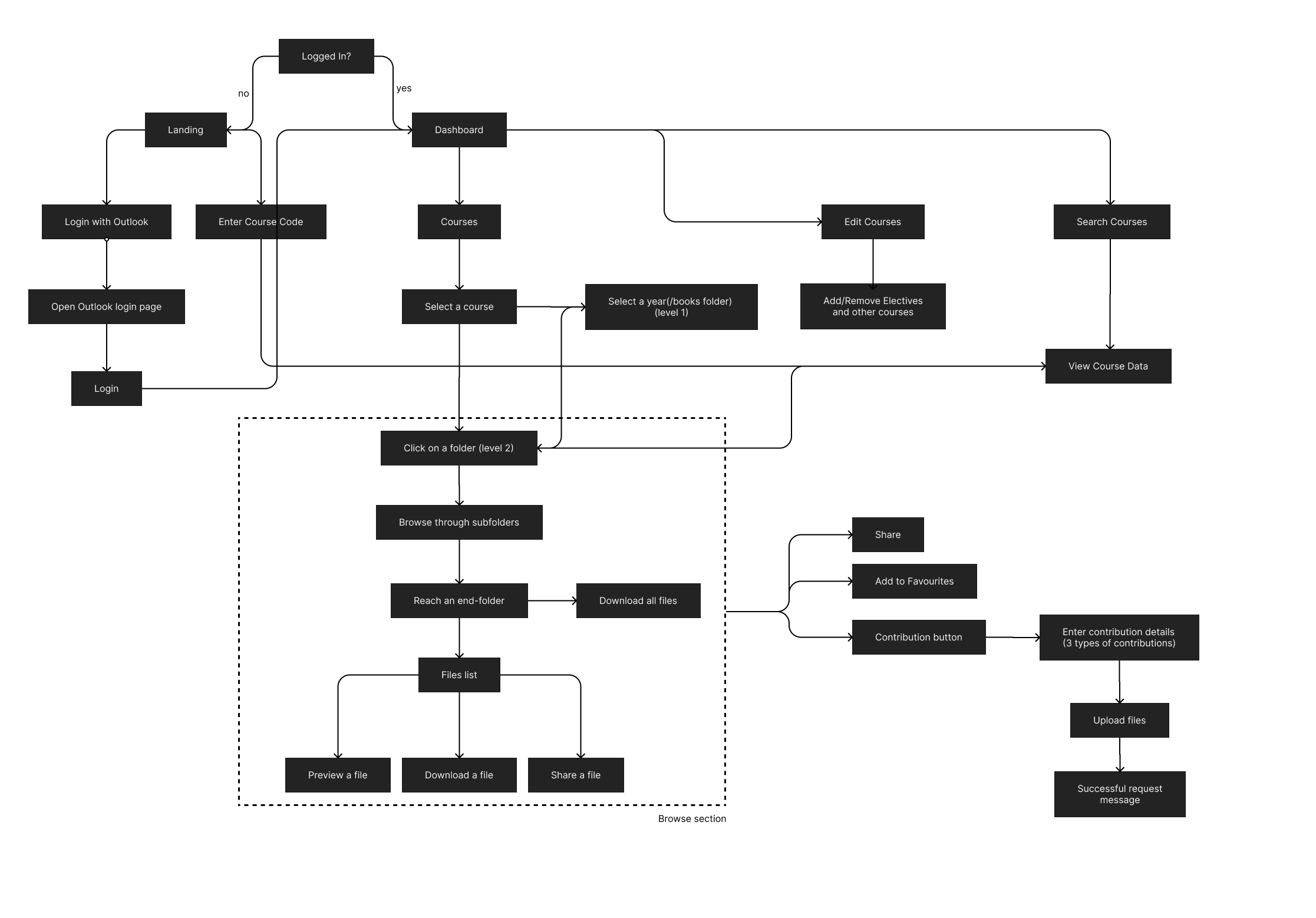
Before any screens were drawn, the first step was mapping how a student gets from the landing page to a file, and how a contribution travels from one student’s laptop to the rest of the class. Laid out like this, it was clear that almost everything people do happens inside a single browse section, so that is where most of the design effort went.

Student flow
Student flow: logged-out students land on the landing page and sign in with Outlook or enter a course code; logged-in students reach the dashboard, select a course, pick a year, browse folders down to a file list, and can preview, download, share, favourite or contribute.
Everything inside the dashed box became the browse screen, and the contribution branch on the right became its own short upload flow.
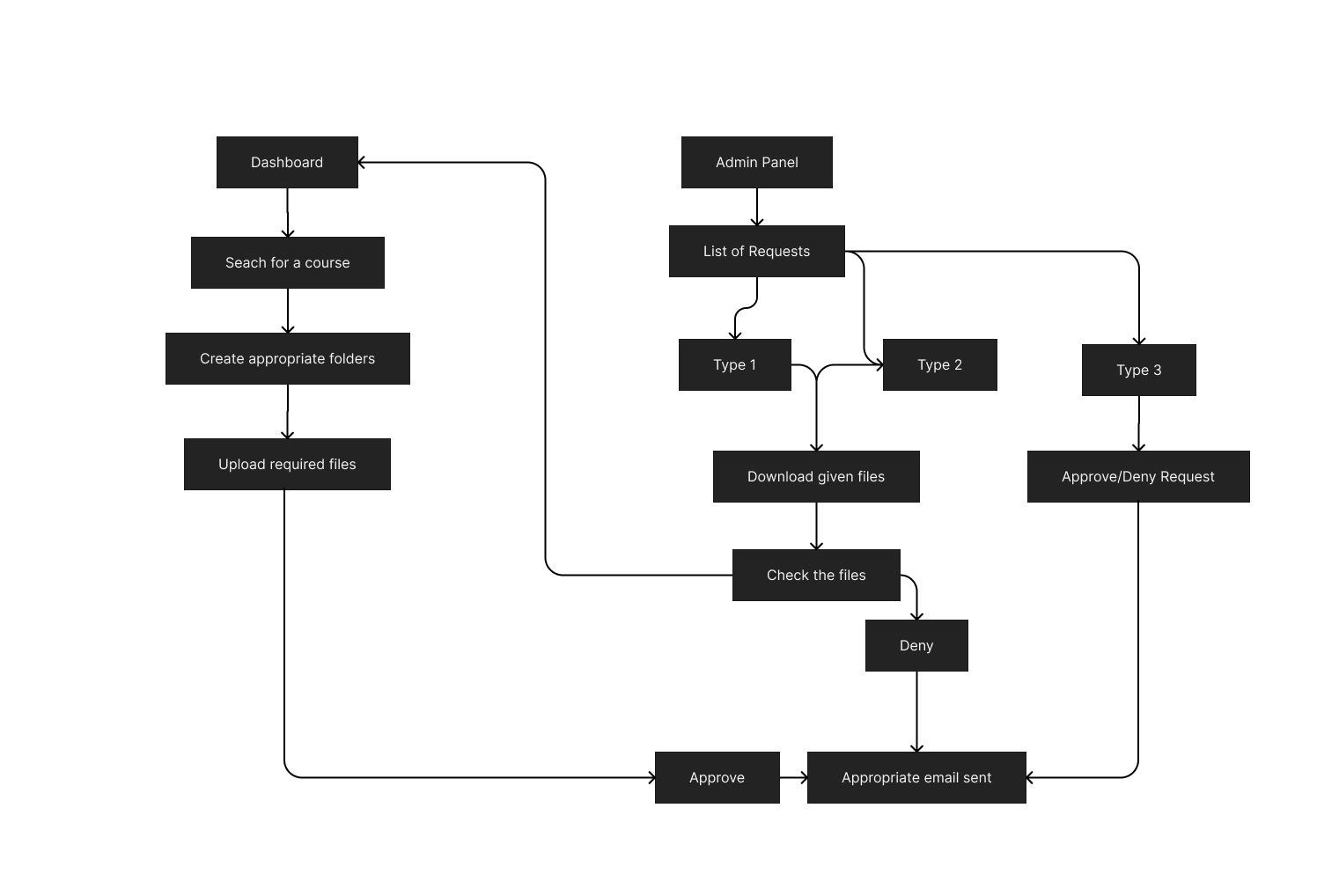
Review flow
Review flow: from the admin panel, open the list of requests, download and check the submitted files, then approve or deny, with an email sent either way. A second path searches for a course, creates folders and uploads files directly.
How a contribution gets checked, filed in the right folder and answered with an email.

The hierarchy

  1. useryou
  2. coursesCL 303
  3. year2024
  4. foldersExams
  5. subfoldersMid-sem
  6. filesAnswer key.pdf

This list later became the shape of the database almost exactly. See the database.

CH104 Design

Wireframes

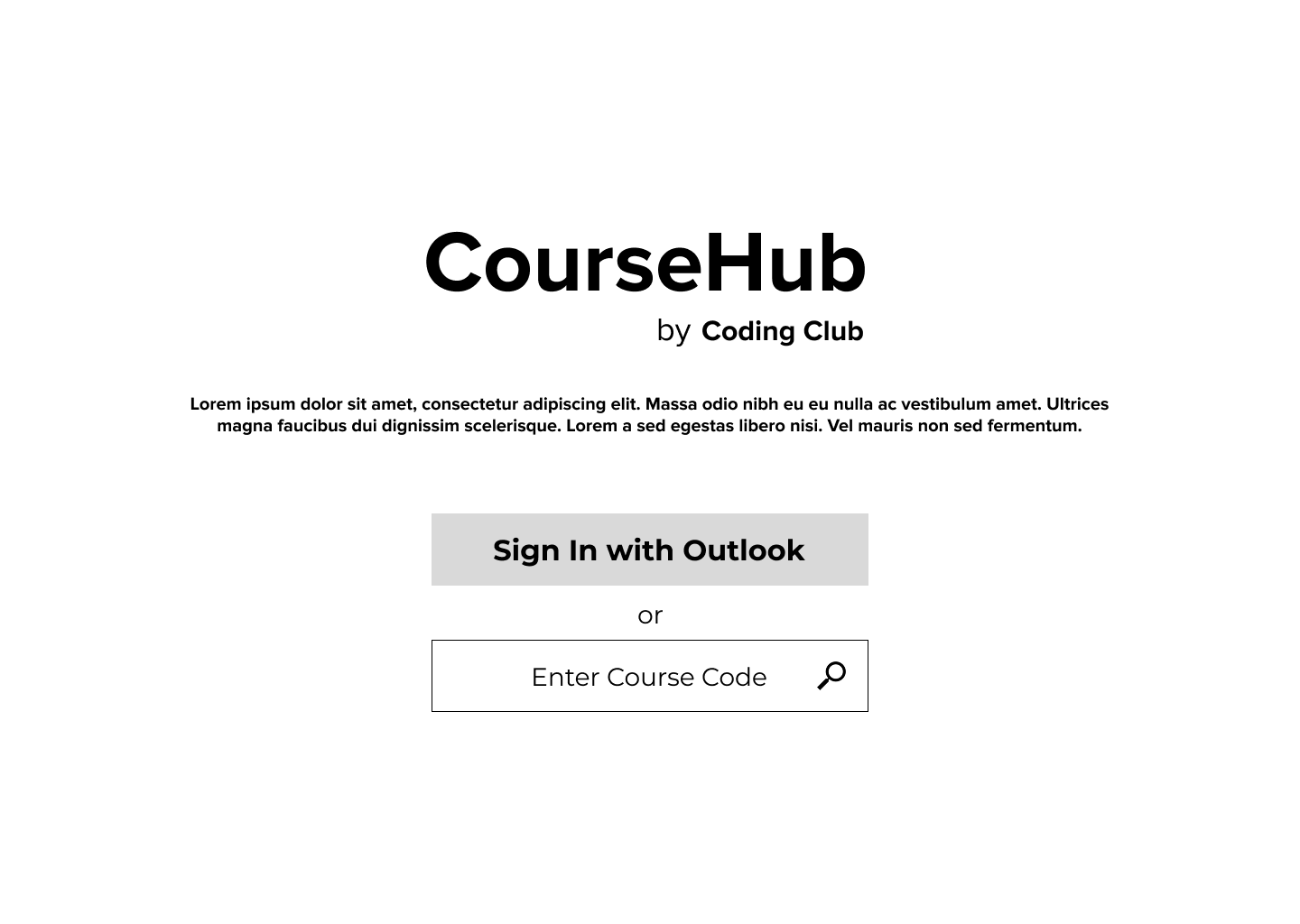
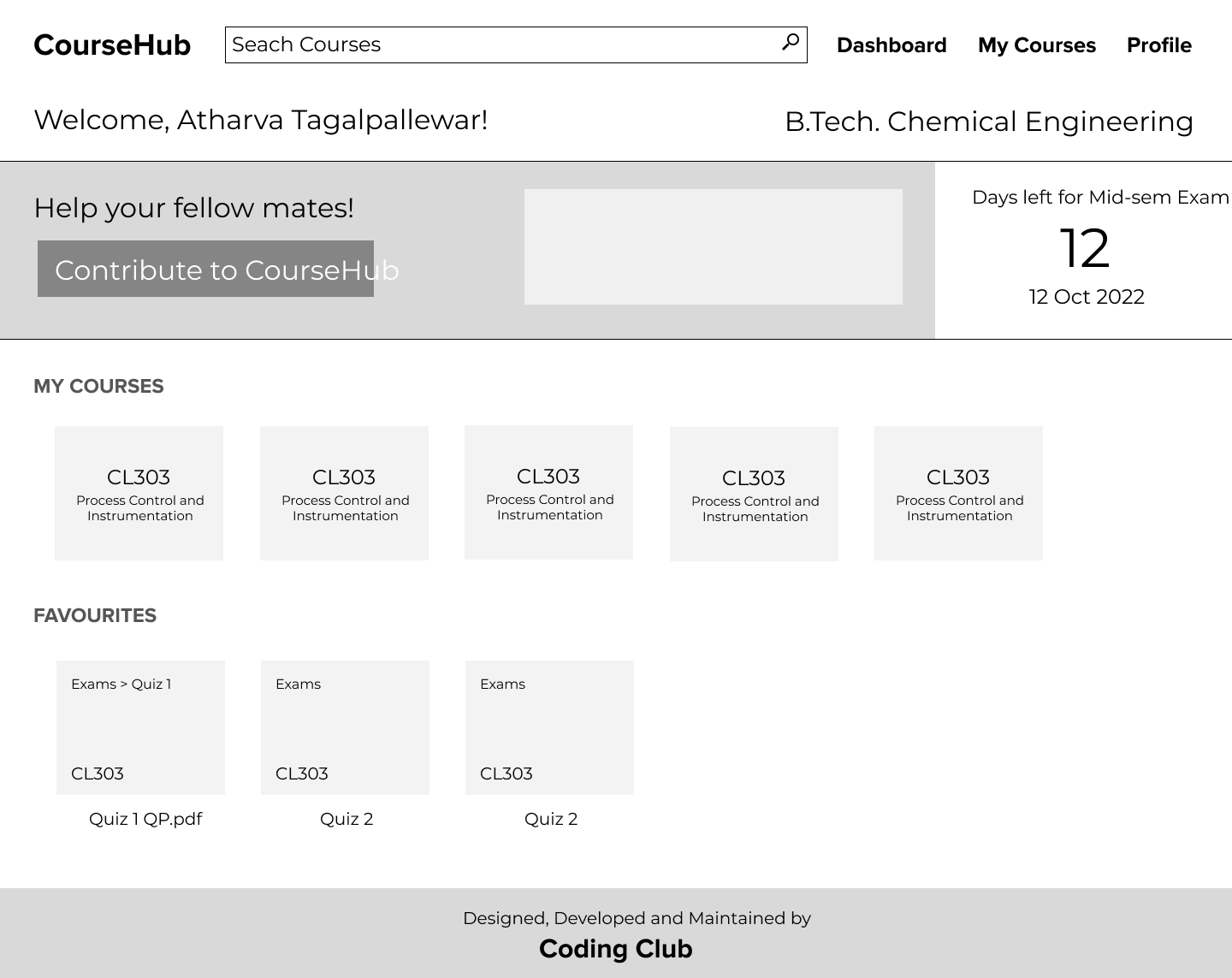
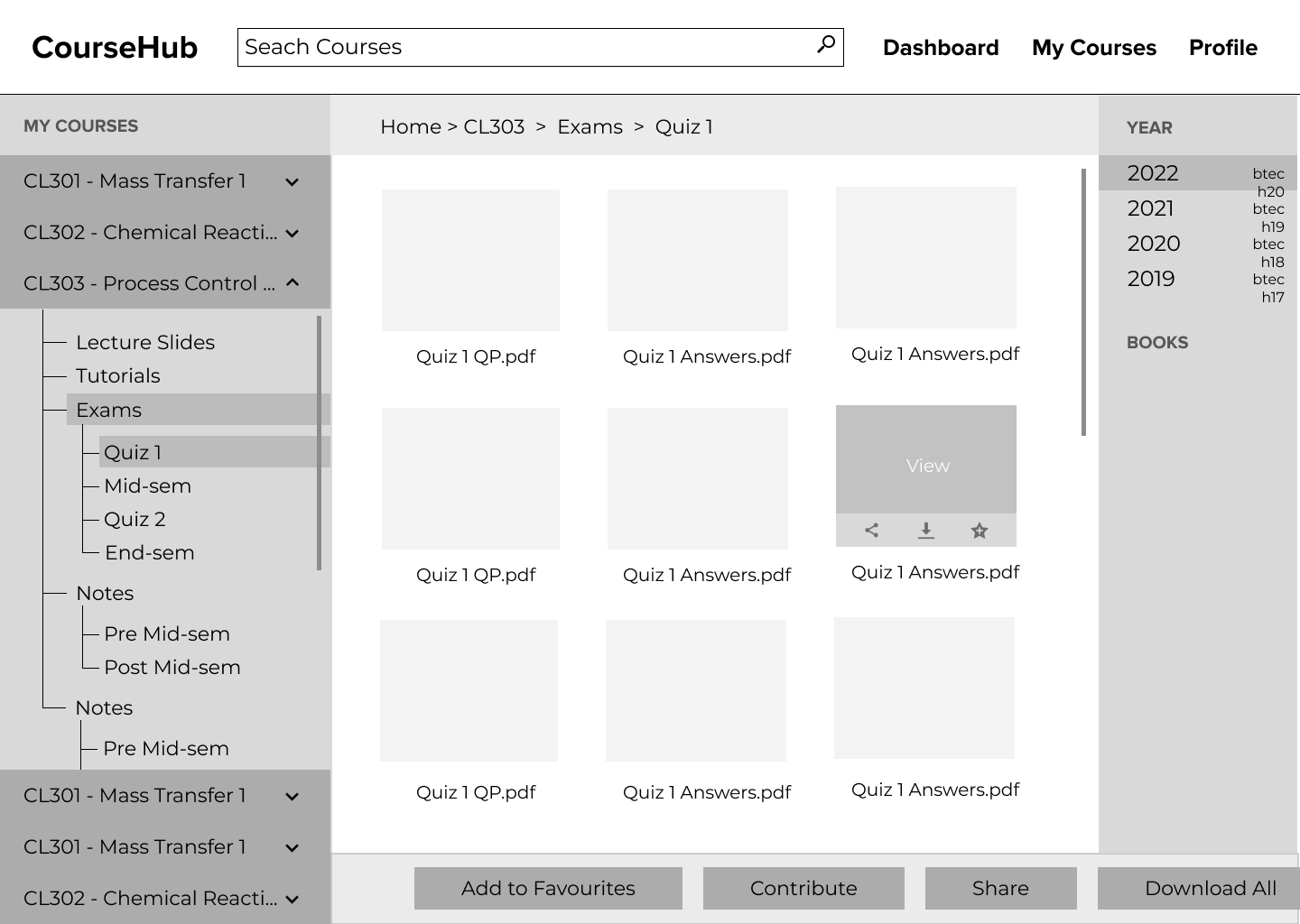
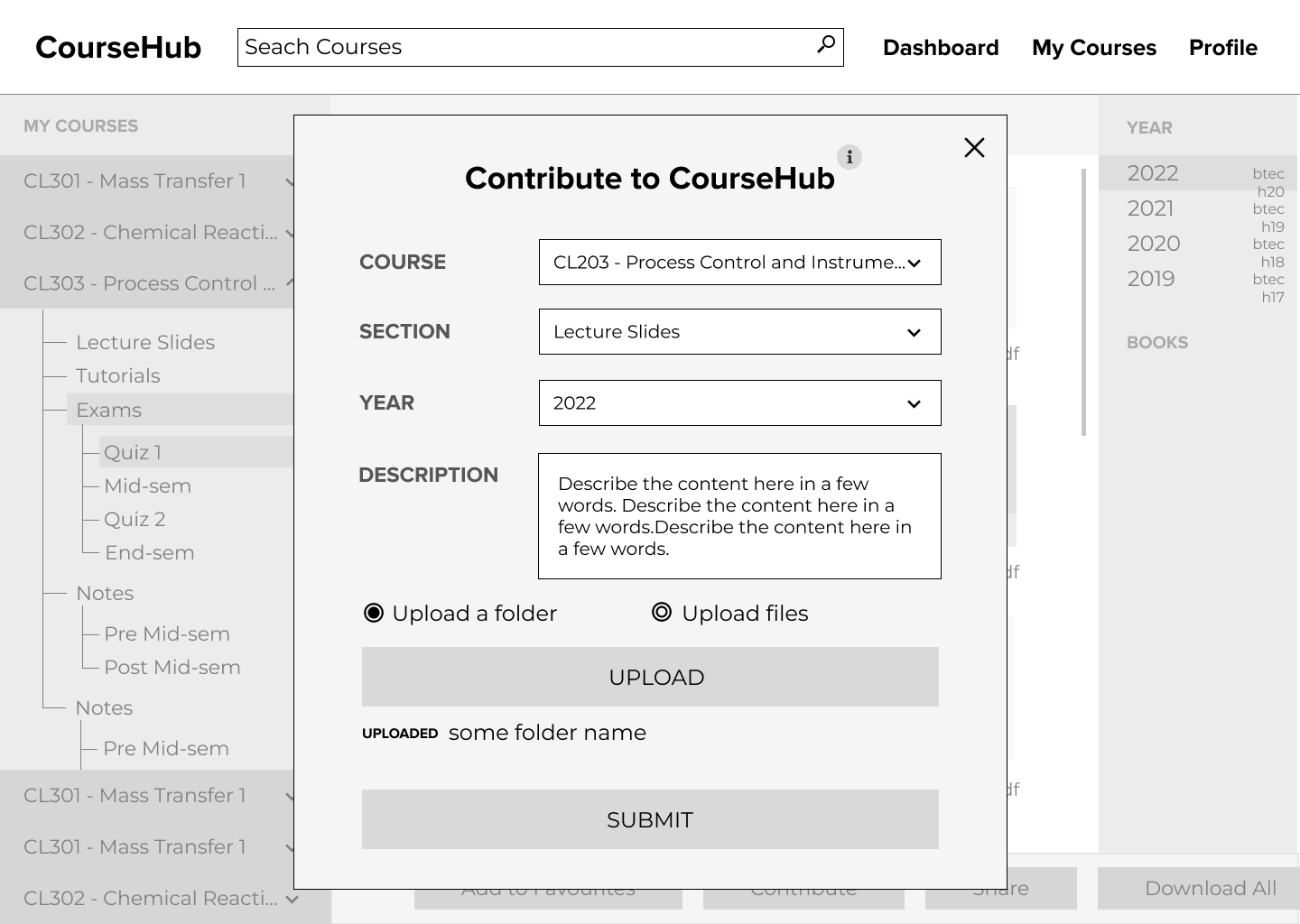
The wireframes stayed in greyscale so the discussions were about structure before anyone started arguing about colours. Most of the final layout was settled here: three panes for browsing, a dashboard built around your own courses, and contributing as a short form that opens on top of whichever folder you are in.

Landing wireframe: the CourseHub name, a short description, a Sign in with Outlook button and an Enter course code field.
LandingSign in with the institute account, or open any course with its code.
Dashboard wireframe: a welcome line with the student's branch, a contribute banner, a mid-sem countdown, and rows of course cards and favourites.
DashboardYour courses, your favourites and a countdown to the next exam.
Browse wireframe: course tree on the left, files of Exams, Quiz 1 in the middle with hover controls, years on the right and actions along the bottom.
BrowseCourses on the left, files in the middle and years on the right.
Contribute wireframe: a modal over the browse screen with course, section, year and description fields, a choice between uploading a folder or files, and upload and submit buttons.
ContributeA form on top of the folder you are in, with the course and section filled in for you.

CH105 Design

Visual design

Going from grey boxes to the final look was mostly about giving CourseHub a personality that felt like something students made for each other rather than another institute portal. The result is a black frame with one warm yellow for anything you can act on, pastel colours for courses, flat shapes with square corners, and illustrations wherever a screen might otherwise feel empty. These are the places where the wireframes and the final design ended up furthest apart.

Wireframe: five identical grey course cards
Wireframe
CL 303Process Control and Instrumentation CL 302Mass Transfer II CL 304Chemical Reaction Engineering HS 201Economic Theory
Final

Course cards

Each course gets a pastel colour when it lands on your account and keeps it everywhere, on the dashboard, in the sidebar and in the app, so after a few weeks you recognise a course by its colour before you read its code.

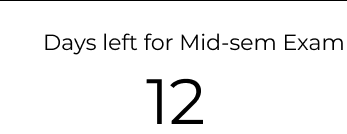
Wireframe: a line of text reading days left for mid-sem exam, 12
Wireframe
12Days for
Mid-sem Exam
64Days for
End-sem Exam
Final

Exam countdown

The countdown grew from a line of text into two large yellow blocks, one for the mid-sem and one for the end-sem. They are the first thing on the dashboard because those two dates decide how everyone uses CourseHub in a given week.

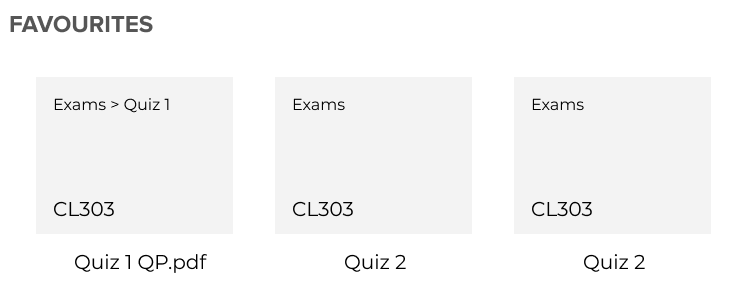
Wireframe: three grey favourite boxes with a path and course code
Wireframe
ExamsQuiz 1Green Chemistry Exams › Quiz 1Quiz 1 QP.pdfChemical Reaction Engineering
Final

Favourites

Saved items became small folders and sheets of paper, so you can tell a saved folder from a saved file at a glance, with the course name printed faintly in the corner like a label.

Wireframe: a plain grey breadcrumb bar reading Home, CL303, Exams, Quiz 1
Wireframe
HomeCL 303Exams

Mid-Sem

Download All FilesContribute
Final

Folder header

The breadcrumb moved into a yellow band with the folder name set large next to it, and the actions that used to sit along the bottom of the screen became two black buttons at the top, where your eyes already are.

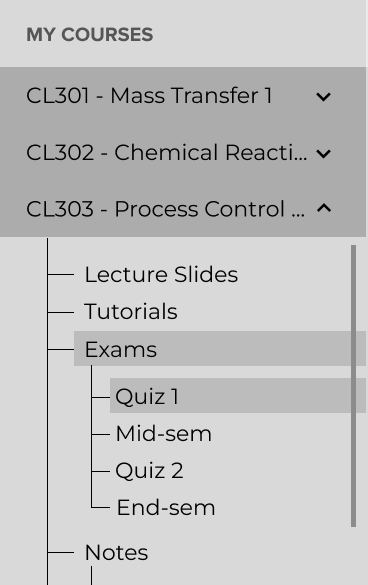
Wireframe: a grey course list with an expanded tree for CL303
Wireframe
  • CL 301Mass Transfer I
  • CL 304Chemical Reaction Engineering
  • CL 303Process Control and Instrumentation
  • Lecture SlidesTutorialsExamsQuiz 1Mid-semQuiz 2End-sem
  • CL 305Green Chemistry
Final

Course list

The sidebar kept its tree, but each course now carries its colour as a strip down the left edge, and the folder you are in is marked with a full yellow row so you never lose your place.

CH106 Design

Design system

The system itself is small on purpose. Black and white carry the structure, yellow marks whatever you can do next, the pastels belong to courses and nothing else, and corners stay square almost everywhere. This page is built from the same pieces.

Colour

  • Ink#000000Frame, nav, type
  • Paper#FFFFFFSurfaces
  • Yellow#FECF6FActions, countdowns
  • Lavender#DBCEFFCourse
  • Pink#FFA7D4Course
  • Blue#6F8FFECourse
  • Lime#EDF492Course
  • Grey#636363Secondary text

Type

The product is set in Proxima Nova. This page uses Montserrat as a free stand-in.

  • Display · BoldCourseHub
  • Title · Light + BoldWelcome, Atharva
  • Label · Bold capsMy courses
  • Body · RegularPDF · 4.2 MB · by Atharva Tagalpallewar

Components

CL 301Mass Transfer I CL 303Process Control
Course card
ExamsQuiz 1Green Chemistry Exams › Quiz 1Quiz 1 QP.pdfMass Transfer
Favourite folder and file
12Days for
Mid-sem Exam
Exam countdown
Contribute to CourseHub Submit Enter Course Code
Buttons and fields
HomeCL 303Exams
PendingApprovedDeclined
Breadcrumb and status
View
Quiz 1 Answer KeyPDF · 4.2 MBby Atharva Tagalpallewar
File tile, on hover

Illustration

Students with papers, from the contribute banner A student at a desk, from the profile A student meditating among books, for empty states A student on a beanbag with a laptop, from favourites A stack of books, from the app's home screen

CH201 Product

Features

This is how a semester with CourseHub plays out, one screen at a time. The screens are rebuilt in HTML from the final designs, and the browse screen works if you click around in it.

coursehub.codingclub.in
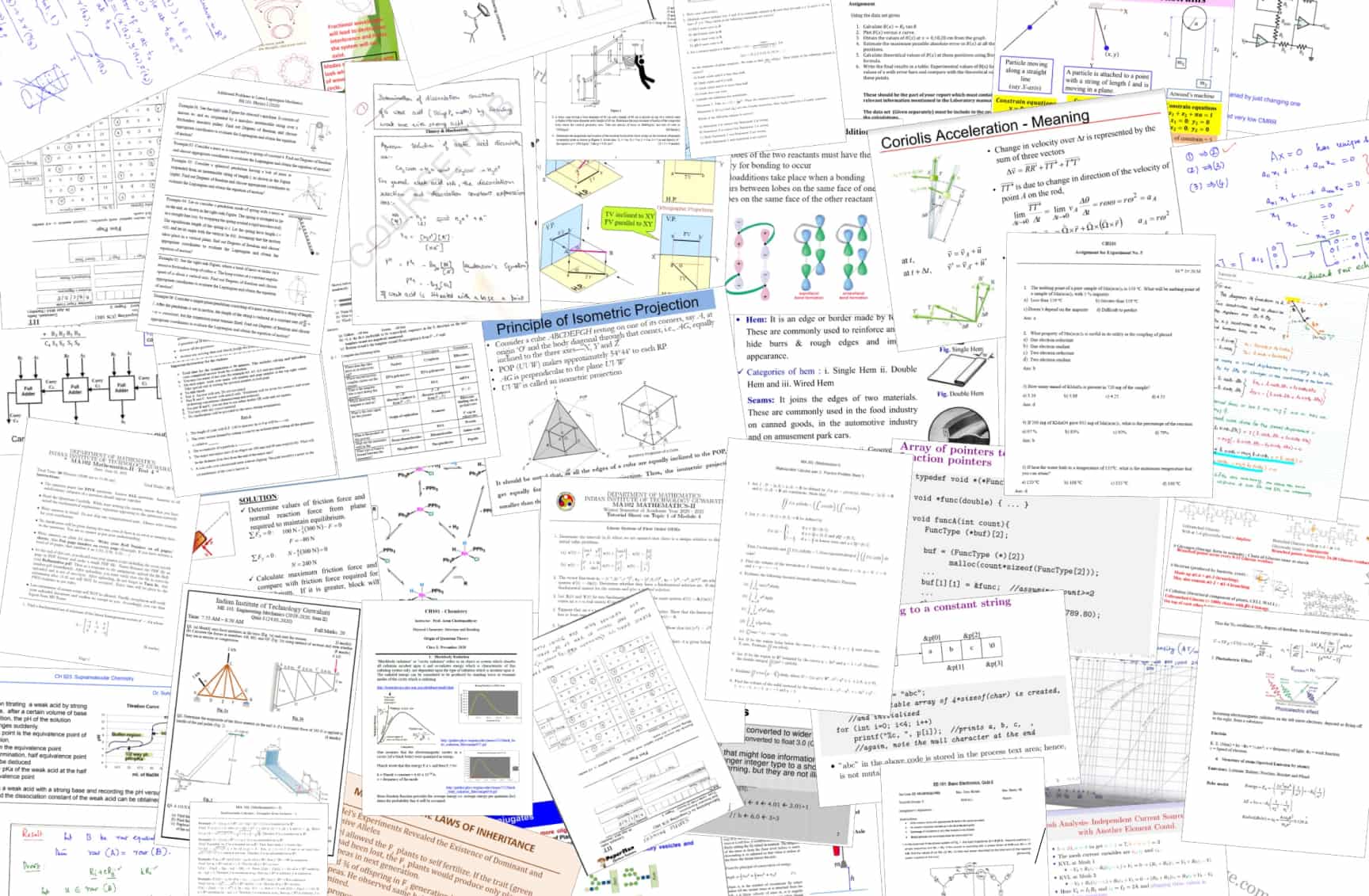
Your go-to platform for all your academic needs. Get access to past papers, lecture slides, assignments, tutorials, notes and more to help you ace your exams

Sign in with Microsoft Enter Course Code
CourseHubSeach Courses

Welcome,

Atharva Tagalpallewar!

B.Tech. Chemical Engineering

12Days for
Mid-sem Exam
64Days for
End-sem Exam

My courses

CL 303Process Control and Instrumentation CL 302Mass Transfer II CL 304Chemical Reaction Engineering CL 305Green Chemistry HS 201Economic Theory MA 202Scientific Computing CL 311Solid Fluid Operations Lab HS 205Technical Report Writing and Presentation +Add Course
Help your fellow mates!

By sharing your notes, past papers and other resources, you’ll not only be helping others succeed, but you’ll also get recognition for your hard work. We’ll feature your name alongside the files you contribute.

Contribute to CourseHub

My favourites

ExamsQuiz 1Green Chemistry Exams › Quiz 1Quiz 1 QP.pdfChemical Reaction Engineering Lecture SlidesPremidsemGreen Chemistry ExamsQuiz 1Green Chemistry Exams › Quiz 1Quiz 1 QP.pdfChemical Reaction Engineering ExamsQuiz 1Green Chemistry Exams › Quiz 1Quiz 1 QP.pdfChemical Reaction Engineering Exams › Mid-semMid-sem paper.pdfMass Transfer II
CourseHubSearch any course

    Year

      Books

      Course Books

      CourseHub

      My profile

      Atharva Tagalpallewar

      B.Tech, Chemical Engineering

      2ndSemester

      My contributions

      • 12 March · 12:58 pmCL303 › 2024 › Lecture Slides

        Slides for weeks five to eight, with the extra examples from the tutorial session.

        Pending
      • 2 March · 9:14 amCL302 › 2024 › Exams › Quiz 1

        Quiz 1 paper and the answer key the professor shared after the quiz.

        Approved
      • 20 February · 6:40 pmCL304 › 2024 › Tutorials

        Tutorial 3, which turned out to be a duplicate of a file that was already there.

        Declined
      CourseHubHub Master

      Atharva Tagalpallewar

      Branch Representative,
      Chemical Engineering

      Verified38contributions

      Pending contributions

      CL303 › 2024 › Lecture Slidesby a classmate12 March · 12:58 pm

      Slides for weeks five to eight, with the extra examples from the tutorial session.

      Download FilesUpload Verified FilesDecline Contribution
      CL302 › 2024 › Exams11 March · 4:20 pm

      Last year’s mid-sem paper with a few of the questions solved.

      Expand
      CL305 › 2024 › Tutorials10 March · 8:05 pm

      Tutorial sheets one to four with solutions.

      Expand
      1. 01

        Sign in

        Signing in takes one button. Students use the Microsoft account the institute already gives them, so there is no sign-up form and no new password to forget. If you only want a quick look, you can type a course code into the bar at the bottom and browse that course without an account.

      2. 02

        Dashboard

        Your courses are already on the dashboard the first time you land on it. CourseHub reads your roll number from your Microsoft profile and looks up this semester’s courses on the academic portal, so the only thing you ever add by hand is an elective from another department. Below them sit the contribute banner and everything you have saved to favourites.

      3. 03

        Browse

        Every course has the same shape: a folder for each year, then lecture slides, tutorials, exams, notes and assignments, with exams always split into Quiz 1, Mid-sem, Quiz 2 and End-sem. You move around with the tree on the left, switch years on the right, and hover over a file to view, download, share or star it. The screen works, so feel free to click around.

      4. 04

        Share

        Any file or folder can be shared as a short link that opens straight to it, which makes it easy to drop the right paper into a class group the night before a quiz.

      5. 05

        Contribute

        Anyone can add to the library from the folder they are looking at. The course and section are filled in for you, so you only write a line about what you are uploading and drop in a folder or a few files. Nothing goes live straight away, which means a wrong file never reaches the whole class.

      6. 06

        Profile

        Your profile keeps a record of everything you have contributed and whether it is pending, approved or declined. Contributors also get their name shown next to the files they shared, which is the promise the contribute banner makes on the dashboard.

      7. 07

        Hub Master

        Hub Master is the reviewing side of CourseHub, designed for branch representatives. It lists every pending contribution for their branch and lets them download the files to check them, then upload the verified ones into the right folder or decline the request. Either way, the contributor hears back.

      CH202 Product

      Mobile app

      Most students reach for their phone before their laptop, so we built CourseHub for Android and iOS in Flutter as well. The app speaks the same visual language as the website, with a black top bar, square pastel course cards and a yellow tab bar that has a raised button in the middle for contributing. After the first sign-in it keeps your courses on the phone, so the library still opens when the hostel Wi-Fi gives up the night before an exam.

      Sign in
      CourseHub

      Welcome,

      Atharva Tagalpallewar

      View your Endsem Schedule and Venue!Exam Schedule

      My courses

      CL 303Process Control and Instrumentation CL 302Mass Transfer II CL 304Chemical Reaction Engineering CL 305Green Chemistry HS 201Economic Theory MA 202Scientific Computing
      HomeBrowse+ContributeFavouritesProfile
      Home
      Home ›
      CL 303
      20242023
      Exams4 foldersCL303 Lecture Slides18 filesCL303 Assignments6 filesCL303 Notes9 filesCL303 Tutorials11 filesCL303 Resources4 filesCL303
      HomeBrowse+ContributeFavouritesProfile
      Course
      CourseHub

      Exam Schedule

      Mid-Semester

      6 April - 12 April

      • Sat6Apr
        3PM to 6PMCL303Transport Phenomenon4202 (Core 4)
      • Mon8Apr
        3PM to 6PMCL301Chemical Process Technology4202 (Core 4)
      • Tue9Apr
        3PM to 6PMCL305Process Design and EconomicsLecture Hall 4
      Exam schedule
      CourseHub

      Group by Course

      CL303 · Process Control

      • 2024 › Exams › Mid-sem ›Mid-sem Answer Key
      • 2024 › Lecture Slides ›Lecture 7: PID Tuning

      CL302 · Mass Transfer II

      • 2024 › Exams › Quiz 1 ›Quiz 1 Question Paper
      • 2023 › Tutorials ›Solution, Tutorial 4

      MA101 · Mathematics I

      • 2023 › Lecture Slides ›Additional Reference Material
      HomeBrowse+ContributeFavouritesProfile
      Favourites

      The app covers the student side of CourseHub: your courses, browsing, previews, favourites and contributions. Files open in an in-app browser tab, and favourites can be grouped by course when the list gets long.

      Over time the app grew beyond the library, starting with an exam schedule that lists each of your papers with its time and venue, worked out from your roll number. A class timetable, an attendance tracker and a drawer for feedback and bug reports followed.

      CH301 Engineering

      System design

      CourseHub was designed to store as little as possible itself. The apps talk to a single Express API, the API keeps the structure of every course in MongoDB, and the files themselves live in OneDrive. Pick a journey below to see how a request moves through the system, or hover over any box.

        CH302 Engineering

        Tech stack

        The team was made of students and would change every year, so the stack sticks to things most of us already knew: JavaScript on the web and the server, Flutter for the app, one database, and managed services for the parts that are hard to run yourself.

        Web app

        React · Vite · Redux

        SCSS for styling, axios with cookies for the API, FilePond for uploads, and a three-pane browse screen that folds into two dropdowns on phones.

        Mobile app

        Flutter · Hive

        One Dart codebase for Android and iOS, with an offline copy of your courses in Hive and Microsoft sign-in through a web authentication session.

        API

        Node · Express · Mongoose

        One folder per domain (auth, course, folder, file, contribution and so on), Joi for validation and pino for logs.

        Admin panel

        React · Tailwind

        Tools for the people running CourseHub: the course catalogue, students, branch representatives and course linking.

        Data and files

        MongoDB · OneDrive · ImageKit

        MongoDB for the course tree and the people, OneDrive through Microsoft Graph for the files, and ImageKit for thumbnails that never expire.

        Hosting

        nginx · PM2 · one VM

        nginx serves the web app and proxies the API, and PM2 keeps the Node process alive on a single small virtual machine.

        CH303 Engineering

        Database

        The hierarchy from the information architecture turned into two collections that point at each other. A course holds its year folders, a folder holds either more folders or files but never a mix of the two, and a file is little more than a pointer into OneDrive.

        Course

        • codeString · unique, normalised
        • nameString
        • children[→ Folder]

        Folder

        • name“2024”, “Exams”, “Mid-sem”
        • childType"Folder" | "File"
        • children[→ refPath childType]
        • courses[String] · shared
        • totalFileCountNumber · cached

        File

        • nameString
        • fileIdOneDrive item id
        • webUrl, downloadUrlGraph share link
        • thumbnailImageKit url
        • isVerifiedBoolean · visibility gate

        User

        • rollNumber, emailunique, from Microsoft
        • degree, department, semester
        • courses[{ code, name, color }]
        • favourites[{ id, path, code }]
        • isBRBoolean · mirrors BR list

        Contribution

        • contributionIdUUID from the client
        • parentFolder→ Folder
        • files[→ File]
        • uploadedBy, courseCode
        • approvedBoolean

        CourseAllotment

        • rollNumber, session, yearunique together
        • courses[String] · portal cache

        BR · Admin · Event

        • BR.emailwho reviews uploads
        • Admin.userIdbcrypt password
        • Eventmid-sem and end-sem dates

        The default shape

        The first time anyone opens a course, the server creates a folder for each recent year, and inside each one Exams (split into Quiz-1, MidSem, Quiz-2 and EndSem), Lectures, Assignments and Resources. Mongoose resolves children through refPath, so a single array can point at folders or at files depending on childType. Every folder also keeps a totalFileCount that is updated up the tree after each change, so the sidebar can show counts without walking the whole subtree.

        CL303                      Course
        └─ 2024                    childType: "Folder"
           ├─ Exams                childType: "Folder"
           │  ├─ Quiz-1            childType: "File"
           │  ├─ MidSem            → 6 files
           │  ├─ Quiz-2
           │  └─ EndSem
           ├─ Lectures             → 24 files
           ├─ Assignments
           └─ Resources

        CH304 Engineering

        Storage

        The files live in OneDrive and MongoDB only keeps track of where they are. The institute gives every account a generous amount of OneDrive storage, far more than a student team could ever pay for on its own servers, and keeping the files there had a second advantage that turned out to matter a lot: the team could open the drive and manage everything directly, rename and reorganise folders, add a whole semester of papers in one go, or export the entire library in bulk if we ever needed to, without building a single admin tool for it. On top of that, everyone with an institute account can already open a OneDrive link.

        1. Start a contributionThe browser makes a UUID and registers it with the course, the folder and the uploader. Uploads from branch representatives are marked approved right here.
        2. Send the filesFilePond posts each file to the API, which buffers it with multer and tags the file name with the uploader.
        3. Hand it to OneDriveThe API opens a Microsoft Graph upload session and streams the bytes into the CourseHub drive.
        4. Make a linkGraph creates a view link scoped to the institute, and the download link is the same address with ?download=1.
        5. Record the pointerA File document stores the OneDrive id, the links and the size, and stays hidden until someone approves it.
        6. Answer the studentThe file joins its folder and the cached file counts are updated all the way up to the course.
        7. Mirror the thumbnailOneDrive thumbnail links expire, so a background task copies each one to ImageKit as WebP without holding up the response.

        CH305 Engineering

        Authentication

        Students never create a CourseHub password. Microsoft confirms who they are, the academic portal tells us what they are studying, and a list kept by the admins says who represents each branch.

        1. Sign inThe browser asks the API to start a login.
        2. Redirect to MicrosoftAn OAuth 2.0 authorisation code flow against the institute’s directory.
        3. Code, then tokenMicrosoft sends the user back with a code, which the API exchanges for an access token.
        4. ProfileMicrosoft Graph returns the name, email, degree and roll number.
        5. Save the userValidated with Joi, and flagged as a branch representative if the email is on the list.
        6. Session cookieA signed JWT in an httpOnly cookie that lasts 24 days.
        7. Find the coursesOn the first sign-in of a semester, the roll number is looked up in that semester’s course allotment.
        8. Cache the answerThe allotment is stored per roll number and semester, so the portal is only asked once.

        Roles

        CanStudentBranch repAdmin
        Browse, download, share and favourite●●●
        Upload files● reviewed● live at once●
        Approve, rename and remove files●●
        Create and rename folders and years●●
        See courses from past semesters●●
        Edit, merge and link courses●
        Manage branch reps and reset a semester●

        Roles are read fresh

        Every request loads the user from the database, so a branch representative’s powers follow the current list rather than whatever the token said when it was issued.

        Changes sign you out

        When someone becomes a branch representative, or a semester is reset, their next request clears the cookie and sends them through sign-in again, which also refreshes their courses.

        Admins sign in separately

        Admins have their own accounts with bcrypt-hashed passwords, their own cookie and their own middleware, completely apart from student sign-in.

        CH306 Engineering

        Caching

        For a long time CourseHub ran on a free cloud server with 1 GB of memory and an eighth of a CPU. Traffic stays quiet for weeks and then the whole batch shows up at once before a quiz, so most of the speed comes from never asking for the same thing twice.

        • Browser · sessionCourse treesThe full tree of every course you opened stays in the tab, so going back to a course is instant.
        • Browser · localAdded coursesElectives you added by hand stay on your device between visits.
        • Phone · HiveOffline libraryThe app keeps your profile, courses and contributions on the phone after the first sign-in.
        • API · memoryOneDrive tokenReused until a minute before it expires, with simultaneous refreshes sharing one request.
        • MongoDBFile counts and allotmentsFolder counts are updated on writes instead of counted on reads, and each student’s course allotment is fetched from the portal once per semester.
        • ImageKit CDNThumbnailsPermanent WebP copies, so file grids load from a CDN instead of asking OneDrive every time.

        CH307 Engineering

        Deployment

        1. Branch off devEvery change goes in as a pull request into dev.
        2. Merge to prodWhen dev is in good shape, it is merged into the prod branch.
        3. Run deploy.shThe script builds the web app into nginx and restarts the API under PM2.

        The mobile app had a GitHub Actions workflow that built and released an APK on every push to its branch. The web side stayed manual and simple on purpose, because the people deploying it changed every year and a short script is easier to hand over than a pipeline. To make that hand-over even easier, the repository carries written docs on the architecture, every endpoint, the data model and the routine jobs like a semester reset.

        CH401 Story

        Launch

        A library is only useful if people know it exists, so the launch got as much design attention as the product: posters with QR codes, posts for Instagram, a pitch deck, and a second round of posters when the app came out on the Play Store.

        CourseHub

        Your ultimate study resource

        Now on
        mobile!

        Endsem
        Schedule
        & Venue

        Techevince

        Best project in the software category

        At IIT Guwahati’s technical exhibition.

        • 3,200+active users
        • 150+courses with material

        CH402 Story

        What I learned

        The biggest lesson from CourseHub is that the hard part of a product like this is rarely the code. The first version worked long before many people used it, and what made it stick were small decisions that are easy to skip: courses that show up without asking, colours you start to remember, a contribute button that is never more than one click away, and a name next to every file someone took the time to share.

        It also changed how I think about building for the people who come next. Choosing tools the next batch already knew, keeping the files somewhere anyone on the team could open, and writing things down meant CourseHub kept running and growing after it was handed over, and that is the part of the project I am proudest of.

        Thanks for reading. If you are at IIT Guwahati, the library is one sign-in away.